

Programming your Hamilton Beach coffee maker is easier than you think. With just a few button presses, you can set a delayed brew time, adjust strength, and wake up to perfectly brewed coffee. This guide walks you through every step—no manual required.
Key Takeaways
- Set a delayed brew time: Use the programmable timer to have coffee ready when you wake up.
- Adjust brew strength: Choose regular or bold flavor based on your taste preference.
- Use the 1-4 cup setting: Prevents over-extraction when brewing smaller amounts.
- Clean regularly: Run a vinegar cycle monthly to maintain performance and taste.
- Reset after power outage: Reprogram the clock and timer if power is interrupted.
- Keep the carafe warm: The warming plate stays on for up to 2 hours after brewing.
- Use fresh, cold water: Always fill the reservoir with fresh water for the best flavor.
Quick Answers to Common Questions
How do I set the timer on my Hamilton Beach coffee maker?
Press and hold the “Program” button, set the desired brew time using the “Hour” and “Minute” buttons, then press “Program” again to confirm.
Can I change the brew strength on my Hamilton Beach coffee maker?
Yes, press the “Strength” or “Brew” button to choose between “Regular” and “Bold” settings for milder or stronger coffee.
Why isn’t my coffee maker brewing at the programmed time?
Check if the clock is set correctly and the timer was saved. Power outages can reset the clock, so reprogram if needed.
How often should I clean my Hamilton Beach coffee maker?
Clean the carafe and parts weekly. Run a vinegar cleaning cycle monthly to remove mineral buildup.
Can I pause brewing to pour a cup early?
Yes, most models have a “Pause ‘n Serve” feature—just lift the carafe slightly to stop the flow mid-brew.
📑 Table of Contents
Why Program Your Hamilton Beach Coffee Maker?
Imagine waking up to the rich, inviting aroma of freshly brewed coffee—without lifting a finger. That’s the magic of programming your Hamilton Beach coffee maker. Whether you’re rushing to work, enjoying a lazy weekend, or hosting guests, a programmable coffee maker saves time and delivers consistent results.
Hamilton Beach is known for making reliable, user-friendly appliances, and their coffee makers are no exception. Most models come with a digital clock, programmable timer, and customizable brew settings. Once you learn how to program Hamilton Beach coffee maker, you’ll wonder how you ever lived without it. No more guessing when the coffee will be ready or settling for stale brews. With just a few simple steps, you can have hot, flavorful coffee waiting for you—exactly when you want it.
What You’ll Need Before You Start
Visual guide about How to Program Hamilton Beach Coffee Maker in Simple Steps
Image source: kitchenseer.com
Before diving into the programming steps, make sure you have everything ready. You don’t need any special tools—just your coffee maker, a power source, and a few basic supplies.
First, ensure your coffee maker is clean. If it’s new, rinse the carafe, filter basket, and water reservoir with warm, soapy water. For older models, run a cleaning cycle with equal parts water and white vinegar to remove mineral buildup. This ensures your coffee tastes fresh and your machine runs smoothly.
Next, gather your coffee and water. Use fresh, cold water from the tap or filtered water for the best flavor. For coffee, choose your favorite ground beans—medium grind works best for most drip machines. Avoid using instant coffee or very fine espresso grinds, as they can clog the filter.
Finally, make sure your coffee maker is plugged in and placed on a flat, heat-resistant surface. Keep it away from edges and out of reach of children or pets. Once everything is set, you’re ready to program your Hamilton Beach coffee maker.
Step-by-Step Guide to Programming Your Coffee Maker
Visual guide about How to Program Hamilton Beach Coffee Maker in Simple Steps
Image source: coffeetalkies.com
Now that you’re prepared, let’s walk through the programming process. The steps may vary slightly depending on your model, but the core features are consistent across most Hamilton Beach coffee makers.
Step 1: Set the Clock
The first thing you’ll need to do is set the current time. This is essential because the programmable timer relies on the clock to know when to start brewing.
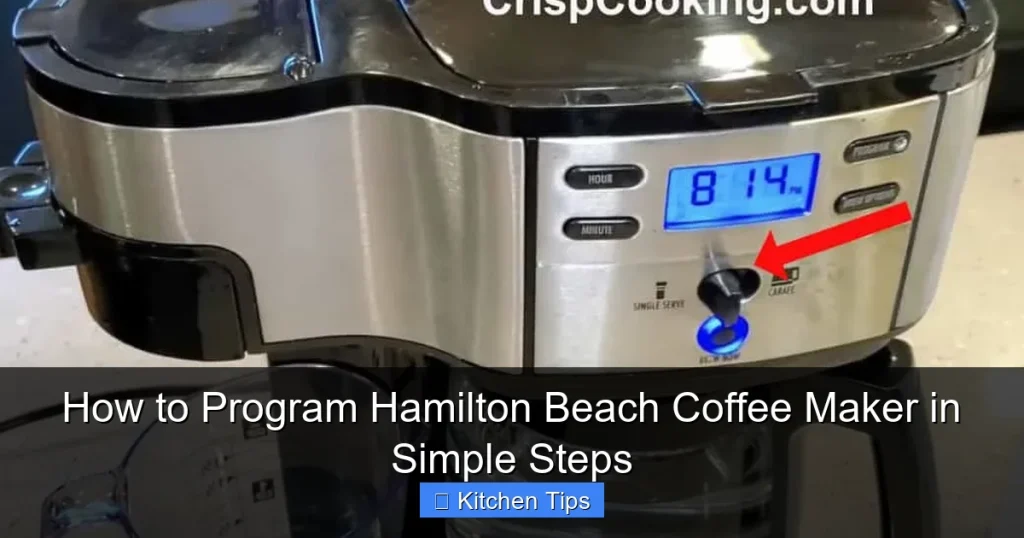
Press and hold the “Hour” button until the display starts blinking. Then, press the “Hour” button repeatedly to set the correct hour. If your model uses a 12-hour format, make sure to set AM or PM correctly. Next, press the “Minute” button to adjust the minutes. Once the time is correct, press the “Clock” button to save it.
For example, if it’s 7:15 AM, set the hour to 7 and the minutes to 15. Then confirm by pressing “Clock.” The display will stop blinking, and the current time will show.
Step 2: Program the Brew Time
Now that the clock is set, you can program when you want the coffee to start brewing. This is perfect for setting it the night before so your coffee is ready when you wake up.
Press and hold the “Program” or “Timer” button. The display will show “Prog” or “Timer” and start blinking. Use the “Hour” and “Minute” buttons to set your desired brew time. For instance, if you wake up at 6:30 AM, set the timer to 6:30.
Once you’ve set the time, press the “Program” button again to confirm. The timer icon (usually a clock or coffee cup symbol) will appear on the display, indicating the timer is active.
Step 3: Choose Your Brew Settings
Hamilton Beach coffee makers often include options to customize your brew. These settings help you get the perfect cup every time.
Look for a “Strength” or “Brew” button. Press it to cycle between “Regular” and “Bold.” If you like stronger coffee, choose “Bold.” This setting slows the water flow, allowing more time for extraction and a richer flavor.
If you’re brewing a small amount—like 1 to 4 cups—use the “1-4 Cup” setting. This reduces the brewing speed to prevent over-extraction, which can make coffee taste bitter. Simply press the “1-4 Cup” button before starting the brew.
Some models also have a “Pause ‘n Serve” feature. This lets you sneak a cup mid-brew without making a mess. Just lift the carafe slightly—the flow will stop automatically.
Step 4: Add Coffee and Water
Now it’s time to add your ingredients. Place a paper filter in the filter basket. Use a #2 or #4 size, depending on your machine. Add your ground coffee—about 1 tablespoon per 6 ounces of water is a good rule of thumb.
For a full 12-cup pot, that’s about 12 tablespoons. Adjust to taste. Then, pour fresh, cold water into the reservoir. Don’t overfill—most machines have a “Max Fill” line. Using too much water can cause overflow or weak coffee.
Step 5: Start the Program
Once everything is set, press the “On” or “Brew” button. The machine will start brewing at the programmed time. If you’re testing it right away, you can press “On” to start immediately.
The warming plate will keep your coffee hot for up to 2 hours after brewing. After that, it automatically turns off to prevent burning. Some models have a “Keep Warm” indicator light to remind you.
Troubleshooting Common Programming Issues

Visual guide about How to Program Hamilton Beach Coffee Maker in Simple Steps
Image source: m.media-amazon.com
Even the best machines can have hiccups. If your Hamilton Beach coffee maker isn’t working as expected, don’t panic. Most issues are easy to fix.
Timer Not Working?
If the coffee doesn’t brew at the set time, check the clock. If the power went out, the clock may have reset. Reprogram the current time and timer. Also, make sure the “Program” button was pressed to save the timer setting.
Coffee Tastes Weak or Bitter?
Weak coffee might mean you used too little coffee or too much water. Try increasing the coffee amount slightly. Bitter coffee could be from over-extraction—use the “1-4 Cup” setting for smaller batches or switch to a coarser grind.
Machine Won’t Turn On?
Check the power cord and outlet. Try plugging another device into the same outlet to confirm it’s working. If the machine still won’t turn on, it may need servicing.
Water Not Heating?
This could be due to mineral buildup. Run a cleaning cycle with vinegar and water. If that doesn’t work, the heating element may be faulty.
Display Is Blank?
A blank display usually means a power issue. Unplug the machine for 10 seconds, then plug it back in. If the display stays off, contact Hamilton Beach support.
Tips for Maintaining Your Coffee Maker
To keep your Hamilton Beach coffee maker running smoothly, regular maintenance is key. A well-cared-for machine brews better coffee and lasts longer.
Clean Weekly
After each use, rinse the carafe, filter basket, and lid with warm, soapy water. Wipe the exterior with a damp cloth. Don’t use abrasive cleaners—they can scratch the surface.
Descale Monthly
Minerals from water can build up inside the machine, affecting performance and taste. Once a month, run a cleaning cycle: fill the reservoir with equal parts water and white vinegar. Run a full brew cycle, then run 2-3 cycles with fresh water to rinse.
Replace Filters
If your model uses a water filter, replace it every 2 months or as recommended. This improves taste and reduces scale buildup.
Store Properly
If you’re not using the coffee maker for a while, unplug it and store it in a dry place. Keep the carafe and parts clean and dry to prevent mold.
Conclusion
Learning how to program Hamilton Beach coffee maker opens up a world of convenience and consistency. With just a few simple steps, you can wake up to perfectly brewed coffee every morning, tailored to your taste and schedule. From setting the clock to choosing brew strength, the process is straightforward and user-friendly.
Regular maintenance ensures your machine stays in top condition, delivering great coffee for years. Whether you’re a coffee connoisseur or just need a reliable morning boost, your Hamilton Beach coffee maker is a valuable kitchen companion.
So go ahead—set that timer tonight. Tomorrow, you’ll thank yourself with a warm, delicious cup of coffee, ready exactly when you are.
Frequently Asked Questions
How do I reset my Hamilton Beach coffee maker?
Unplug the machine for 10 seconds, then plug it back in. This resets the electronics and clears any errors.
What type of coffee grind should I use?
Use a medium grind for best results. Avoid very fine or coarse grinds, as they can affect brewing and taste.
Can I use a reusable filter?
Yes, most Hamilton Beach models work with reusable mesh filters. Just make sure it fits securely in the basket.
How long does the warming plate stay on?
The warming plate stays on for up to 2 hours after brewing, then automatically turns off to prevent burning.
Why is my coffee maker leaking?
Leaks can happen if the carafe isn’t seated properly or the filter is overfilled. Check alignment and reduce coffee amount if needed.
Can I program my coffee maker the night before?
Absolutely! Set the timer before bed, add coffee and water, and wake up to fresh, hot coffee in the morning.