

Learn how to use a Hamilton Beach Brewstation like a pro with this complete guide. From setup to maintenance, we’ll walk you through every step to brew rich, delicious coffee without the mess. Whether you’re a beginner or upgrading your routine, these tips will help you get the most out of your Brewstation.
Key Takeaways
- Easy Setup: The Hamilton Beach Brewstation doesn’t use a carafe—just fill the water reservoir, add coffee, and press brew.
- No Drips, No Mess: The unique dispensing system lets you pour coffee directly without lifting a heavy pot or dealing with spills.
- Programmable Features: Set it up the night before and wake up to freshly brewed coffee with the auto-brew timer.
- Consistent Temperature: The heating plate keeps coffee hot for hours without burning or overcooking.
- Simple Cleaning: Removable parts and a self-cleaning function make maintenance a breeze.
- Custom Brew Strength: Use the “Bold” setting for a stronger cup or regular for a smoother taste.
- Energy Efficient: The auto-shutoff feature saves power and gives you peace of mind.
Quick Answers to Common Questions
Can I use paper filters in the Hamilton Beach Brewstation?
Yes, you can use #2 or #4 paper filters if you prefer. Just make sure they fit securely in the reusable filter basket to avoid grounds in your coffee.
How much coffee should I use per cup?
Use one scoop (about 10 grams or 2 tablespoons) of ground coffee per 6-ounce cup of water. Adjust to taste—more for stronger, less for milder.
Does the Brewstation keep coffee hot?
Yes, the built-in heating plate keeps coffee hot for up to two hours. After that, the machine automatically shuts off.
Can I brew tea in the Hamilton Beach Brewstation?
It’s not recommended. The machine is designed for coffee, and using tea leaves could clog the system or affect flavor.
How often should I clean my Brewstation?
Clean the filter basket and exterior after each use. Run a vinegar cleaning cycle weekly and descale monthly if you have hard water.
📑 Table of Contents
- Introduction: Why the Hamilton Beach Brewstation Stands Out
- Getting Started: Setting Up Your Hamilton Beach Brewstation
- Brewing Your First Cup: Step-by-Step Instructions
- Advanced Features: Programmable Brewing and Customization
- Cleaning and Maintenance: Keeping Your Brewstation in Top Shape
- Troubleshooting Common Issues
- Conclusion: Brew Like a Pro Every Day
Introduction: Why the Hamilton Beach Brewstation Stands Out
If you’re tired of messy spills, burnt coffee, or the hassle of washing a carafe every morning, the Hamilton Beach Brewstation might just be your new best friend. This innovative coffee maker has gained a loyal following for its drip-free design, ease of use, and consistent brewing performance. Unlike traditional drip coffee makers, the Brewstation uses a unique dispensing system that eliminates the need for a glass carafe—meaning no more cracked pots or coffee dripping down the side when you pour.
Whether you’re brewing for one or serving a small office, the Hamilton Beach Brewstation delivers convenience without sacrificing flavor. It’s perfect for busy mornings, late-night study sessions, or whenever you crave a fresh cup without the cleanup drama. In this guide, we’ll walk you through everything you need to know—from unboxing and setup to advanced brewing techniques and maintenance tips—so you can use your Brewstation like a true coffee pro.
Getting Started: Setting Up Your Hamilton Beach Brewstation
Before you brew your first cup, it’s important to set up your Brewstation correctly. The good news? It’s incredibly straightforward. Start by unboxing your unit and removing all packaging materials. You’ll find the coffee maker, a water reservoir lid, a reusable filter basket, and a measuring scoop. Some models also include a water filter or cleaning brush—check your model’s manual to confirm.

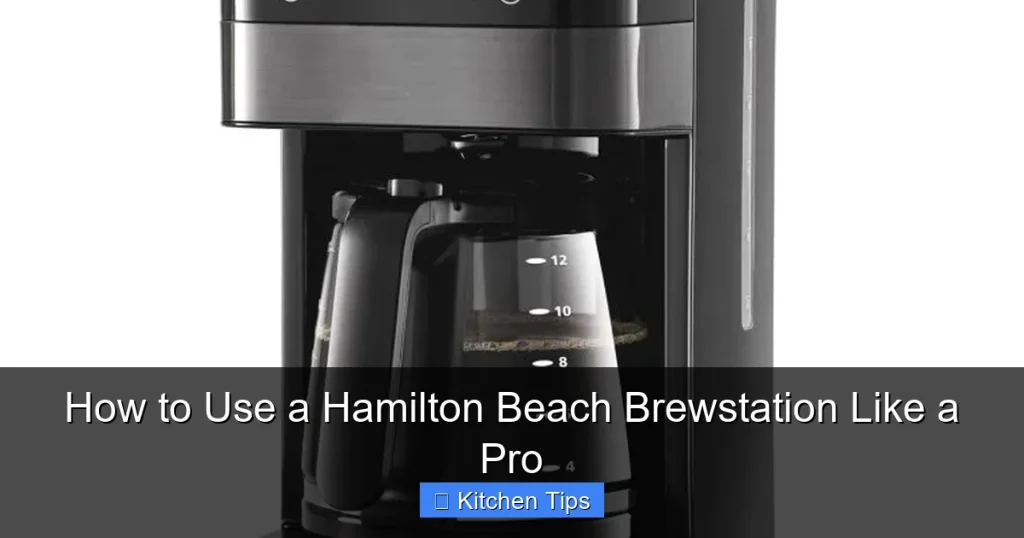
Visual guide about How to Use a Hamilton Beach Brewstation Like a Pro
Image source: boatbasincafe.com
Step 1: Wash Removable Parts
Before the first use, wash the filter basket, water reservoir, and any other removable components with warm, soapy water. Rinse thoroughly to remove any residue. This ensures your coffee tastes fresh and clean from the very first brew.
Step 2: Fill the Water Reservoir
Open the top lid and locate the water reservoir at the back of the machine. Use cold, filtered water for the best taste. Fill it to your desired level—most Brewstations have markings for 4, 6, 8, or 10 cups. Avoid overfilling, as this can cause leaks or overflow during brewing.
Step 3: Insert the Filter and Add Coffee
Place the reusable mesh filter into the filter basket. If you prefer paper filters, you can use a #2 or #4 size—just make sure it fits snugly. Add ground coffee using the included scoop. A general rule is one scoop (about 10 grams) per cup of water. For a stronger brew, use the “Bold” setting (more on that later).
Step 4: Close the Lid and Power On
Secure the top lid and plug in the machine. Press the power button to turn it on. The Brewstation will begin heating the water. You’ll hear a gentle gurgling sound as the coffee starts to brew—this is normal and means it’s working properly.
Brewing Your First Cup: Step-by-Step Instructions
Now that your Brewstation is set up, it’s time to brew your first cup. The process is simple, but a few small details can make a big difference in flavor and convenience.

Visual guide about How to Use a Hamilton Beach Brewstation Like a Pro
Image source: electricskilletguide.org
Choosing the Right Coffee Grind
For optimal results, use a medium grind—similar to table salt. Too fine, and you risk over-extraction and bitterness. Too coarse, and the coffee may taste weak. If you’re using pre-ground coffee, look for labels that say “drip” or “automatic drip.” If you grind your own beans, adjust the setting to medium for the best balance.
Using the Bold Brew Setting
One of the standout features of the Hamilton Beach Brewstation is the “Bold” button. When pressed, it slows down the brewing process, allowing more time for water to extract flavor from the grounds. This results in a richer, more intense cup—perfect for dark roast lovers or anyone who likes their coffee strong. Simply press the “Bold” button before starting the brew cycle.
Pouring Without the Mess
Here’s where the Brewstation truly shines. Once brewing is complete, place your mug under the dispensing spout and press down on the lever. Coffee flows smoothly into your cup—no lifting, no tilting, no spills. The drip-free design means you can pour quickly without worrying about drips on your counter. For larger servings, use a thermal carafe or travel mug with a wide opening.
Example: Morning Routine Made Easy
Imagine this: It’s 6:30 a.m., and you’re rushing to get ready for work. You place your favorite mug under the spout, press the lever, and—voilà—hot, fresh coffee pours directly into your cup. No fumbling with a heavy carafe, no burnt coffee on the warming plate, and no cleanup beyond rinsing your mug. That’s the Brewstation advantage.
Advanced Features: Programmable Brewing and Customization
The Hamilton Beach Brewstation isn’t just simple—it’s smart. With programmable features, you can customize your brewing experience to fit your lifestyle.

Visual guide about How to Use a Hamilton Beach Brewstation Like a Pro
Image source: talkleisure.com
Auto-Brew Timer
Want to wake up to the smell of fresh coffee? Use the auto-brew timer. The night before, add water and coffee, then set the timer using the digital clock on the front panel. Choose your brew time, and the machine will automatically start brewing at the scheduled moment. Just make sure the “Auto Brew” light is on and the machine is plugged in.
Adjustable Brew Strength
As mentioned earlier, the “Bold” setting enhances flavor extraction. But you can also adjust strength by varying the coffee-to-water ratio. For a milder cup, use slightly less coffee. For extra strength, add an extra scoop or two. Experiment to find your perfect balance.
Keep Warm Function
The Brewstation’s heating plate keeps coffee at an ideal serving temperature (around 185°F) for up to two hours. After that, the machine automatically shuts off to prevent burning. This feature is great for slow drinkers or families who brew once and sip throughout the morning.
Energy-Saving Auto-Off
Safety and efficiency go hand in hand. The Brewstation turns off automatically after two hours, reducing energy use and minimizing fire risk. This is especially helpful if you’re prone to forgetting to unplug appliances.
Cleaning and Maintenance: Keeping Your Brewstation in Top Shape
Like any kitchen appliance, your Hamilton Beach Brewstation needs regular care to perform at its best. Fortunately, cleaning is quick and easy—thanks to its thoughtful design.
Daily Cleaning Routine
After each use, remove the filter basket and discard the used grounds. Rinse the basket under warm water. Wipe the exterior and dispensing spout with a damp cloth to remove any coffee residue. This prevents buildup and keeps your machine looking new.
Weekly Deep Clean
Once a week, run a cleaning cycle using a mixture of equal parts water and white vinegar. Fill the reservoir with the solution, run a full brew cycle, then run two more cycles with fresh water to rinse. This removes mineral deposits and keeps the internal components functioning smoothly.
Descaling for Hard Water Areas
If you live in an area with hard water, mineral buildup can affect performance over time. Use a commercial descaling solution or follow the vinegar method above every 1–2 months. Check your user manual for specific recommendations based on your model.
Replacing the Water Filter (If Applicable)
Some Brewstation models come with a built-in water filter to improve taste and reduce scale. Replace the filter every 60 days or as recommended. This is especially helpful if you notice a change in coffee flavor or slower brewing times.
Troubleshooting Common Issues
Even the best machines can run into occasional hiccups. Here’s how to solve the most common Brewstation problems.
Coffee Tastes Weak
If your coffee lacks flavor, try using more grounds, selecting the “Bold” setting, or switching to a fresher roast. Also, ensure you’re using the correct grind size—too coarse can lead to under-extraction.
Machine Won’t Turn On
Check that the unit is plugged in and the outlet is working. Make sure the water reservoir isn’t empty—some models won’t brew without water. If the issue persists, consult the troubleshooting section of your manual or contact Hamilton Beach support.
Leaking or Dripping
Leaks usually happen if the water reservoir is overfilled or the lid isn’t closed properly. Also, check that the filter basket is seated correctly. If the spout drips after pouring, wipe it clean—residual coffee can cause minor dripping.
Brewing Takes Too Long
A slow brew cycle can indicate mineral buildup. Run a vinegar cleaning cycle to clear the internal pathways. Also, ensure you’re not using excessively fine grounds, which can clog the filter.
Conclusion: Brew Like a Pro Every Day
Using a Hamilton Beach Brewstation like a pro isn’t about complicated steps—it’s about understanding its strengths and using them to your advantage. From the drip-free pour to the programmable timer, this coffee maker is designed to make your mornings smoother and your coffee better. With the right setup, brewing technique, and maintenance routine, you’ll enjoy rich, consistent coffee day after day.
Whether you’re a coffee connoisseur or just someone who needs a reliable caffeine fix, the Brewstation delivers convenience without compromise. So go ahead—press that brew button, pour yourself a perfect cup, and savor the simplicity. Your future self (and your taste buds) will thank you.
Frequently Asked Questions
What makes the Hamilton Beach Brewstation different from other coffee makers?
The Brewstation eliminates the carafe, using a direct-dispense system that prevents spills and drips. It also features programmable brewing, a bold setting, and auto-shutoff for convenience and safety.
Can I leave water in the reservoir overnight?
It’s best to empty the reservoir after each use to prevent stale water or bacterial growth. Refill with fresh, cold water before brewing.
Why is my coffee brewing slowly?
Slow brewing can be caused by mineral buildup or using too fine a grind. Clean the machine with vinegar and ensure you’re using a medium grind for optimal flow.
Is the Brewstation compatible with reusable filters only?
No, you can use either the included reusable mesh filter or standard paper filters (#2 or #4 size). Both work well—choose based on your preference.
How do I set the auto-brew timer?
Press the “Program” button, set the desired brew time using the hour and minute buttons, then press “Program” again to confirm. Make sure “Auto Brew” is enabled.
What should I do if my Brewstation stops working?
First, check the power source and ensure the water reservoir isn’t empty. If the issue persists, consult the user manual or contact Hamilton Beach customer support for assistance.